

Australia 1300 780 204
Contact us
Complete an online enquiry form or contact your local Command Digital Signage office.
Newsletter
Subscribe now and keep up to date.

Digital Signage Software
The Second Generation of digital signage has arrived.
Advanced features include:
Basic to Enterprise Level Options
PC, Mac, Linux Admin
Easy to Use Interface
User Rights Control
Multi-Level Scheduling
High Performance Player
Screen Zoning
Digital Signage Success starts here.
Sothink
Powerful & Comprehensive Design Software
The Flash SWF file is one of the most favoured types of media files for digital signage.
Sothink offer a range of products designed to create or manipulate SWF files.
These include:
SWF Easy;
SWF Quicker; and
SWF Decompiler.
SWF Easy
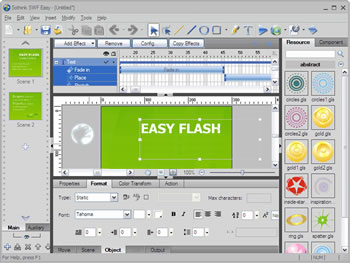
SWF Easy is the entry-level software for the creation of swf files for digital signage.
It offers drawing tools such as Line, Pencil, Pen, Oval and Rectangle and advanced editing tools such as Transform and Reshape .
SWF Easy has 60+ animated Flash effects with the ability to combine separate effects into numerous new effects.
The user has the option to adjust effect duration simply by drag and drop and loop effect is supported.
SWF Easy is suitable for users with little knowledge of graphics creation.
SWF Quicker
SWF Quicker is an advanced media content creation software that supports a diverse range of file formats for import and output.
Importable media types include AI, MP3, MPEG, AVI, MOV, AVI, MPEG, WMV/ASF, MOV/QT, RM/RMVB, DivX/XviD, etc.
Export formats include SWF(including 10.0), EXE, GIF, AVI and Flash Lite (2.0, 2.1, 3.0).
SWF Quicker includes a full set of vector drawing tools, such as Rectangle, Pen, Brush, Eraser, Paint Bucket, etc and is suitable for the advanced user.
SWF Decompiler
SWF Decompiler is a leading Flash decompiler and Flash to HTML5 converter.
The software converts SWF to FLA, SWF to FLEX and easily extracts Flash resources like shape, image, sound (mp3, wav), video (flv), text, sprite, ActionScript, etc.
Some of the main features of SWF Decompiler include:
Edits SWF by replacing image/shape/text/sound;
It supports Flash CS3/CS4/CS5 and ActionScript 2.0/3.0;
Able to get XFL file from Flash CS5 SWF;
Globally searches all ActionScript;
Exports SWF resources in batch;
One-click to free capture & download online Flash;
Multilingual and user-friendly.
Need more information?
For any questions about how a Command Digital Signage System would be suitable for your business or to arrange a time for an on-site or on-line demonstration, please contact us on 1300 780 204 or through our enquiry form.
Command products and solutions are also available through your local AV and IT professionals.